
Public transportation in Abu Dhabi has transformed dramatically over the past few years, and one major innovation that simplified commuting for thousands of residents and visitors is the Hafilat card. This smart card system has revolutionized how people pay for bus rides, making travel in Abu Dhabi smoother, faster, and entirely cashless. Whether you are a daily commuter, a student, or a tourist exploring the capital, understanding how to manage your Hafilat recharge and Hafilat balance check is essential.
Hafilat Recharge & Balance Check Online
The Hafilat card eliminates the need for paper tickets, ensuring you can tap and go. But like any prepaid service, it requires regular top-ups and periodic balance checks to ensure uninterrupted travel. Thankfully, Abu Dhabi’s Department of Transport (DoT) and Integrated Transport Center (ITC) have made the recharge and balance inquiry process incredibly user-friendly, offering multiple online and offline options to suit everyone’s convenience.
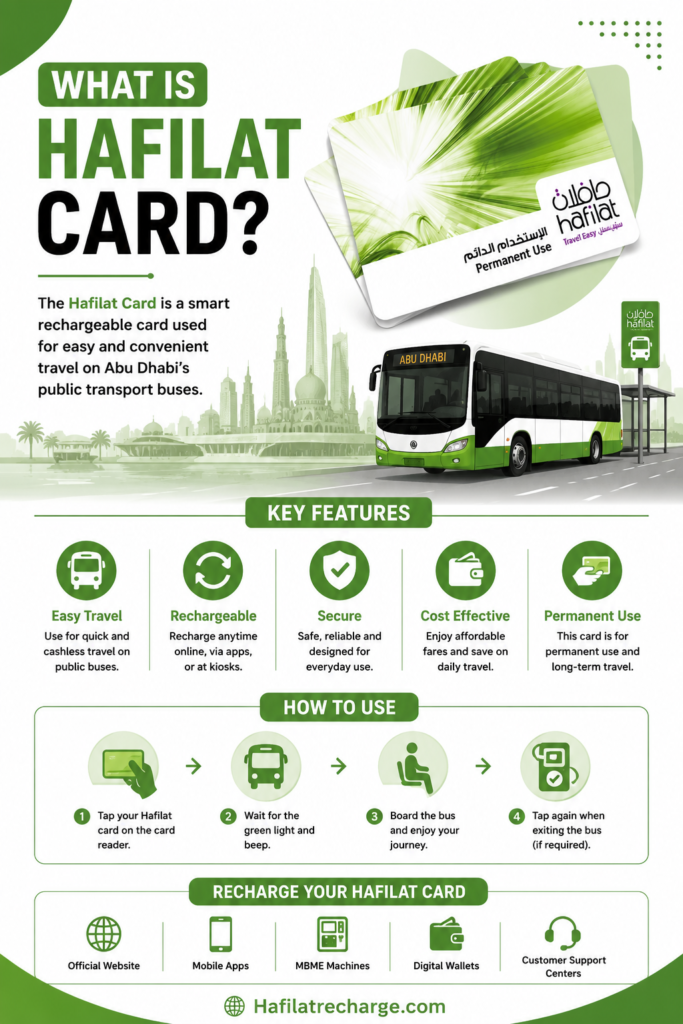
What is the Hafilat Card
The Hafilat card is a smart, contactless bus card introduced by the Abu Dhabi Department of Transport. The word “Hafilat” means “bus” in Arabic, reflecting its primary purpose, simplifying public transport payments. With this card, passengers can board Abu Dhabi buses and pay their fares electronically by tapping their card on the reader.
Each card is linked to a prepaid account that must be topped up periodically. Users can add funds through several convenient channels, including Hafilat online recharge options, physical machines, and authorized vendors. The card is ideal for residents, tourists, and even students who use Abu Dhabi’s modern and affordable public bus network.
Hafilat Recharge Online (Step By Step)
Keeping your Hafilat card topped up ensures you never face a delay during your daily commute. Below is a clear and detailed process to recharge your Hafilat card online and offline.
Step 1: Visit Official Hafilat Website
If you want to recharge your card online through the official website of Hafialt, first you must have to visit its official website, and this is the only way to recharge Hafialt Card online. you can easily access the official website by following this URL (https://hafilat.darb.ae/Identification.aspx).

Step 2: Click On Recharge Card Option
Once you land on the official website of Hafilat, you will see an option “Recharge Card” click on it to proceed.

Step 3: Enter Card Serial Number
Once you click on the Recharge card option, you will be asked to enter your 15-digit card serial number given on your physical card. Once you enter your card number accurately, click on the “Ok” Button to proceed.

Step 4: Select Recharge Options (Amount)
Here there are predefined recharge amount is given like 10 AED, 15 AED, 20 AED, 25 AED, 30 AED, etc. Now it depends on you which option or amount you will select. Thus, select your desired amount to proceed with recharging your Hafilat card.

Step 5: Proceed to Payment
Now select the payment methods among given below
- Credit Card
- Debit Card
- Apple Pay
- Google Pay
Once you select your payment method, now it’s time to enter payment details such as card number, expiry date, and PIN and confirm the transaction.

Step 6: Wait for Confirmation
Once the transaction is done successfully, you will receive a confirmation message on your number or email, and the new balance will be reflected in your account.
Hafilat Recharge Offline Methods (5)
Not everyone is comfortable with online transactions, and that’s perfectly fine. Abu Dhabi’s system is inclusive, offering several reliable offline methods for an Abu Dhabi bus card recharge.
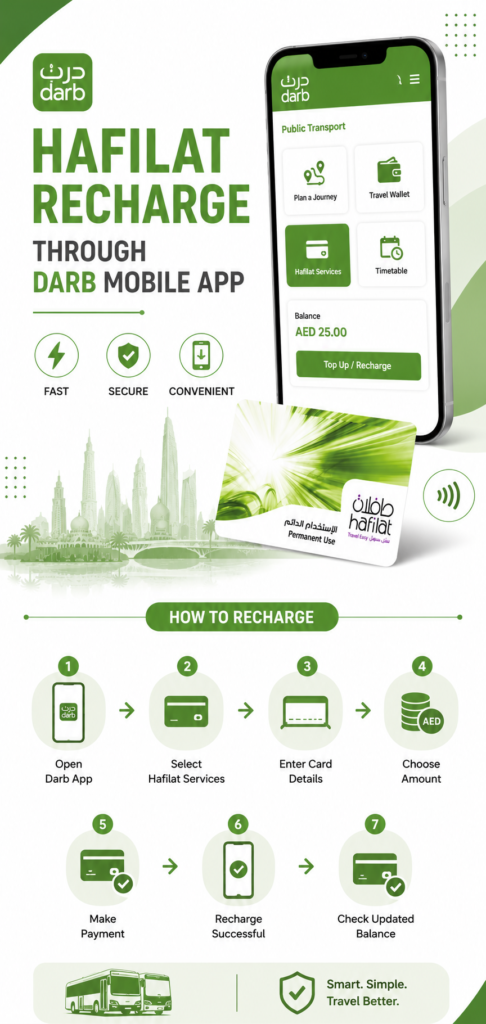
Hafilat Recharge through Darb Mobile App
The Darb Mobile App provides a quick and convenient way to recharge your Hafilat card directly from your smartphone. Many Abu Dhabi commuters prefer this method because it allows users to manage transport services, check balances, and complete recharges anytime without visiting physical service centers. The app is simple to use and supports secure online payments for fast Hafilat top-up services.
Steps To Recharge Card
Hafilat Recharge Online Via Payit Mobile Wallet
Payit Mobile Wallet offers a fast and user-friendly way to recharge your Hafilat card without visiting ticket counters or transport offices. The app allows passengers to complete secure online top-ups directly from their smartphones within a few minutes. Many daily commuters use this method because it is simple, reliable, and convenient for managing public transport payments anytime in Abu Dhabi.
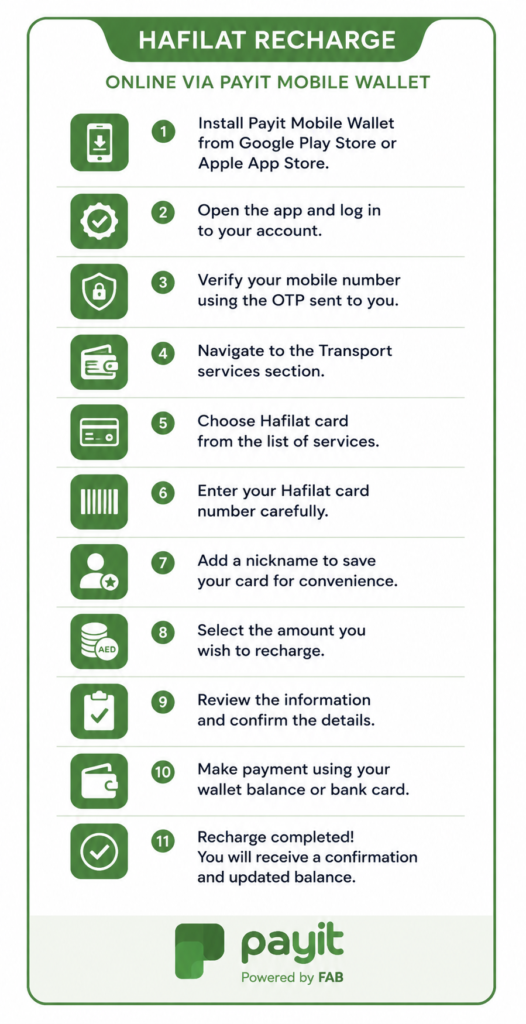
Steps To Recharge a Card VIA Payit
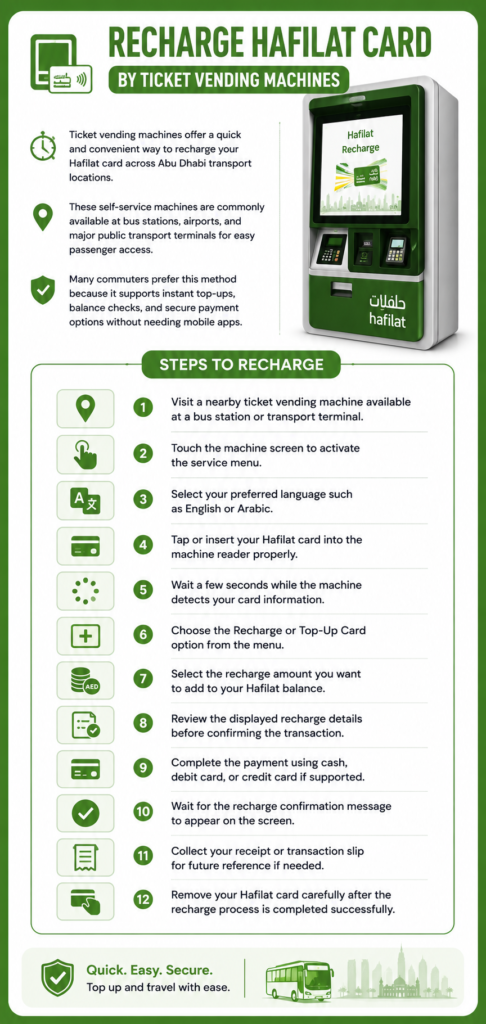
Ticket Vending Machines (TVMs)
Ticket vending machines offer a quick and convenient way to recharge your Hafilat card across Abu Dhabi transport locations. These self-service machines are commonly available at bus stations, airports, and major public transport terminals for easy passenger access. Many commuters prefer this method because it supports instant top-ups, balance checks, and secure payment options without needing mobile apps.
Steps To Recharge Card VIA TVMS
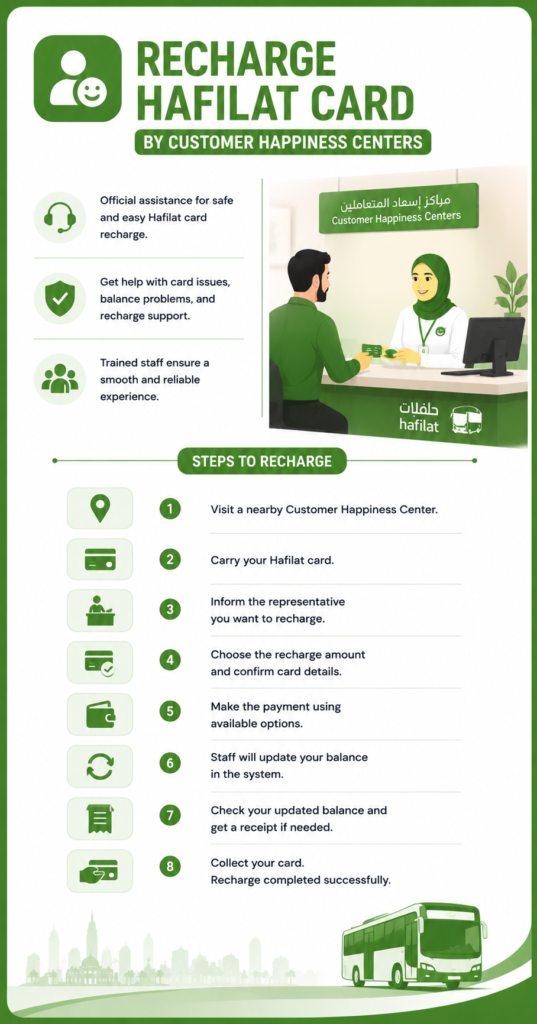
Recharge Hafilat Card By Customer Happiness Centers
Customer Happiness Centers provide official assistance for passengers who want to recharge their Hafilat cards safely and easily. These centers are helpful for users facing card issues, balance problems, or recharge difficulties during travel. Many commuters prefer this option because trained staff members guide users through the recharge process directly.
Steps To Recharge a Card
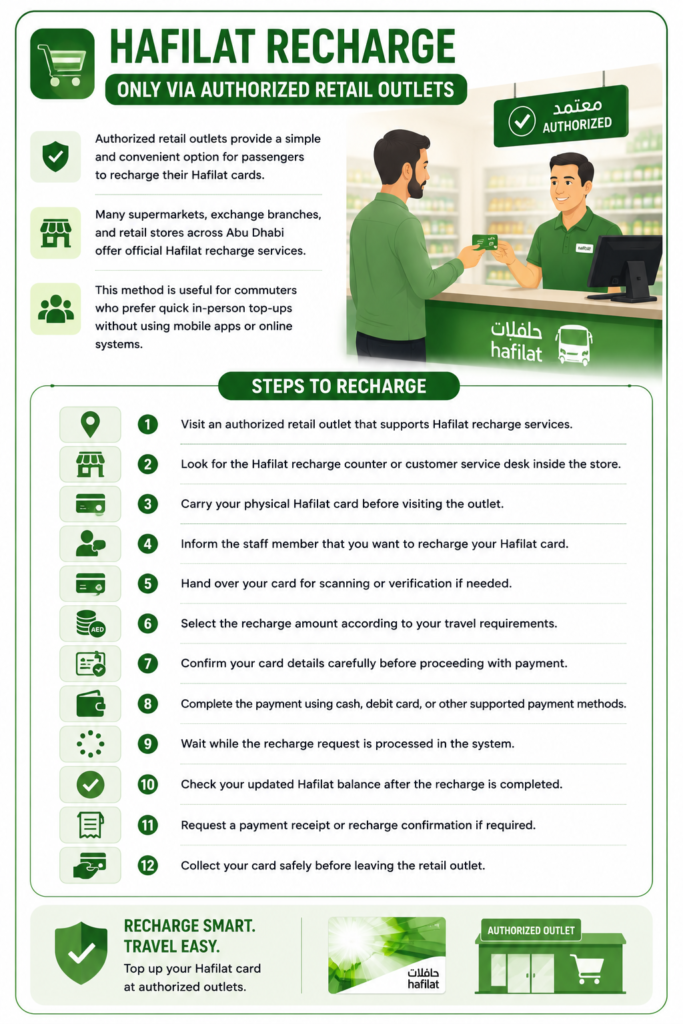
Hafilat Recharge Only Via Authorized Retail Outlets
Authorized retail outlets provide a simple and convenient option for passengers who want to recharge their Hafilat cards during daily shopping or regular visits. Many supermarkets, exchange branches, and retail stores across Abu Dhabi offer official Hafilat recharge services for public transport users. This method is useful for commuters who prefer quick in-person top-ups without using mobile apps or online systems.
Steps To Recharge Card
Hafilat Balance Check Online (Step By Step)
Checking your Hafilat balance online ensures that you’re always aware of your available funds before boarding the bus. Here’s how you can easily do it:
Step 1: Visit Official Website
You have to visit the Hafilat Official website for a balance check as well. To check Hafilat balance and visit the official website you must follow this URL (https://hafilat.darb.ae/Identification.aspx).

Step 2: Click On Recharge Card
If you are a new user, then you must have to create an account before checking your balance, but if you already have an account, just click on the “Recharge Card” option, as you can see in the image given below. Even you can check Hafilat balance without logging as well.

Step 3: Enter Card Serial Number
Once you click on the recharge card, you will be redirected to the new page where you have to enter your card serial number given on your physical card at the bottom. Carefully enter that 15-digit number and click on ok button.

Step 4: View Balance
Once you click on the “Ok” button, your available balance will be shown, and from the same page, you can recharge your card as well. A complete recharge guide is given above.

Checking Your Hafilat Balance Using the Darb App
The Hafilat mobile app (Darb) makes managing your card even easier. Available on both Android and iOS platforms, the app lets users access their Hafilat card balance check and recharge features anytime.
This mobile convenience helps users perform a bus card balance check online in seconds, ensuring a smooth travel experience across Abu Dhabi.
Checking Hafilat Balance Offline
If you do not have internet access or prefer traditional methods, you can still easily perform a Hafilat check balance offline.
Ticket Vending Machines (TVMs)
his is the most comprehensive offline method. Insert your card into a TVM at any major bus station. The screen will not only display your current balance but can also show a history of your recent trips and the fares deducted. It’s a great way to audit your travel expenses.
On-Bus Card Readers
The simplest and most immediate way to perform a Hafilat balance check is to use the card reader on any bus. When you tap your card as you exit the bus, the reader screen will briefly display the remaining balance on your card. You need to be quick to see it, but it’s a handy real-time check. You can also politely ask the bus driver if you can tap your card just to check the balance without taking a trip.
Customer Service Centers
For a detailed statement or if you suspect an error, visiting a customer service center at a main bus station is your best bet. The staff can provide you with a printed statement of your card’s transaction history and current balance.
Types of Hafilat Passes
The Hafilat system offers multiple card types and passes to suit various passengers’ needs. Here’s a breakdown:
Anonymous Hafilat Card
This is a prepaid card for short-term users or tourists. It doesn’t require registration and can be easily topped up at vending machines or service centers.
Personalized Hafilat Card
Linked to the passenger’s personal details, this card allows balance recovery if lost or stolen. It also enables online services like Hafilat balance check and Hafilat online recharge.
Student Hafilat Card
Designed for school and university students, offering discounted fares. Requires a valid student ID or enrollment proof to apply.
Senior Citizen Hafilat Card
Issued to elderly residents of Abu Dhabi, providing free or discounted bus travel. It helps promote independent mobility among seniors.
Special Needs (People of Determination) Card
This card grants free or reduced-fare travel for individuals with disabilities. It’s issued upon verification of relevant documents from authorities.
Weekly, Monthly, and Annual Hafilat Passes
These are time-based passes for unlimited travel within selected zones. Ideal for frequent commuters who want hassle-free travel without frequent recharges.
FAQ’S About Hafilat
2. How to check Hafilat card balance online?
Go to Home page of Hafialt official website, select recharge card, enter your card serial number and click ok. Now you can see your available balance.
3. Can I check my bus card balance offline?
Yes, you can check it through vending machines, bus validators, or customer service counters.
4. Is there a Hafilat balance check number?
In some cases, the ITC provides an SMS service for checking balances, but users should confirm the number on the Hafilat website.
5. Can I recharge another person’s Hafilat card?
Yes, you can recharge any Hafilat card online or at vending machines by entering the card number, regardless of ownership.
Conclusion
The Hafilat card system has made commuting across Abu Dhabi incredibly simple and efficient. From Hafilat recharge to Hafilat card balance check, every feature is designed with passenger convenience in mind. Whether you prefer online recharge via the official website or using vending machines for an offline top-up, the process is straightforward and accessible to everyone.
By understanding how to check your Hafilat card balance online, use the mobile app, and explore various pass types, you can ensure smooth, uninterrupted travel across the city. Always keep an eye on your balance, recharge in advance, and make use of digital tools to save time and effort.
